OpenArm KER Setup
For makers
Both the M5Stack firmware and encoder module firmware are in the same repository. You can find them here:
Before you start, please clone the repository.
git clone https://github.com/enactic/openarm_ker_firmware
cd openarm_ker_firmware
How to write M5Stack firmware
Link to the repository
Setup
1. Connect the USB cable to the M5Stack and your PC.
2. Set up udev rules for flashing the firmware. Please run the following command in your terminal.
Set up for normal use (you can skip this if you already set up the udev rules for the KER CLI)
echo 'SUBSYSTEM=="usb", ATTRS{idVendor}=="303a", MODE="0666"' | sudo tee /etc/udev/rules.d/99-m5stack.rules
sudo udevadm control --reload-rules && sudo udevadm trigger
Set up for flashing the firmware to the M5Stack
SERIAL=$(udevadm info -q property -n /dev/ttyACM0 | grep ID_SERIAL_SHORT | cut -d= -f2)
sudo tee -a /etc/udev/rules.d/99-m5stack.rules << EOF
SUBSYSTEM=="tty", ATTRS{idVendor}=="303a", ATTRS{idProduct}=="1001", ATTRS{serial}=="$SERIAL", MODE="0666", SYMLINK+="m5_ker_485"
EOF
sudo udevadm control --reload-rules && sudo udevadm trigger
Verify the connection with the following command.
lsusb | grep 303a
303a:4002 should appear in the output.
3. PlatformIO project setup
cd M5
uv venv --seed
source .venv/bin/activate
uv pip install platformio
4. Flash firmware
Put M5Stack into boot mode (hold RST 3 seconds until green LED lights up), then:
pio run -e usb --target upload
Press RST once to reboot.
Zero position calibration
If the zero position has not been written to the KER, please refer to the following guide:
How to write to encoder module
For this part, you need a USB-serial UPDI programmer (Adafruit UPDI Friend, serialUPDI). It appears as e.g. /dev/ttyUSB0 (CH340E).
For example,
-
Standard — Switch Science 9535 / Adafruit 5879
-
High-Voltage — DigiKey 5893 / Adafruit 5893. Adds a 12V pulse for chips whose UPDI pin is fused as reset/GPIO, and for unbricking.
The standard version is enough for normal use; the HV version is handy if you ever need to recover a bricked chip.
Link to the repository
Connection
PC → (USB) → USB-serial UPDI programmer → (UPDI) → encoder module
Setup
Set up the PlatformIO project the same way as the M5 firmware section above.
cd encoder
uv venv
source .venv/bin/activate
uv pip install platformio
udev (or add user to dialout group)
Add udev rules for the encoder module. Please run the following command in your terminal.
echo 'SUBSYSTEM=="tty", ATTRS{idVendor}=="1a86", ATTRS{idProduct}=="7523", MODE="0666"' | sudo tee /etc/udev/rules.d/99-serialwriter.rules
sudo udevadm control --reload-rules && sudo udevadm trigger
or you can add the user to the dialout group to access the serial port without sudo.
sudo usermod -aG dialout $USER
Flash firmware through the USB-serial UPDI programmer
After that you can write the firmware to the encoder module with the following command.
Ensure that the USB-serial UPDI programmer is connected to the encoder module and the PC.
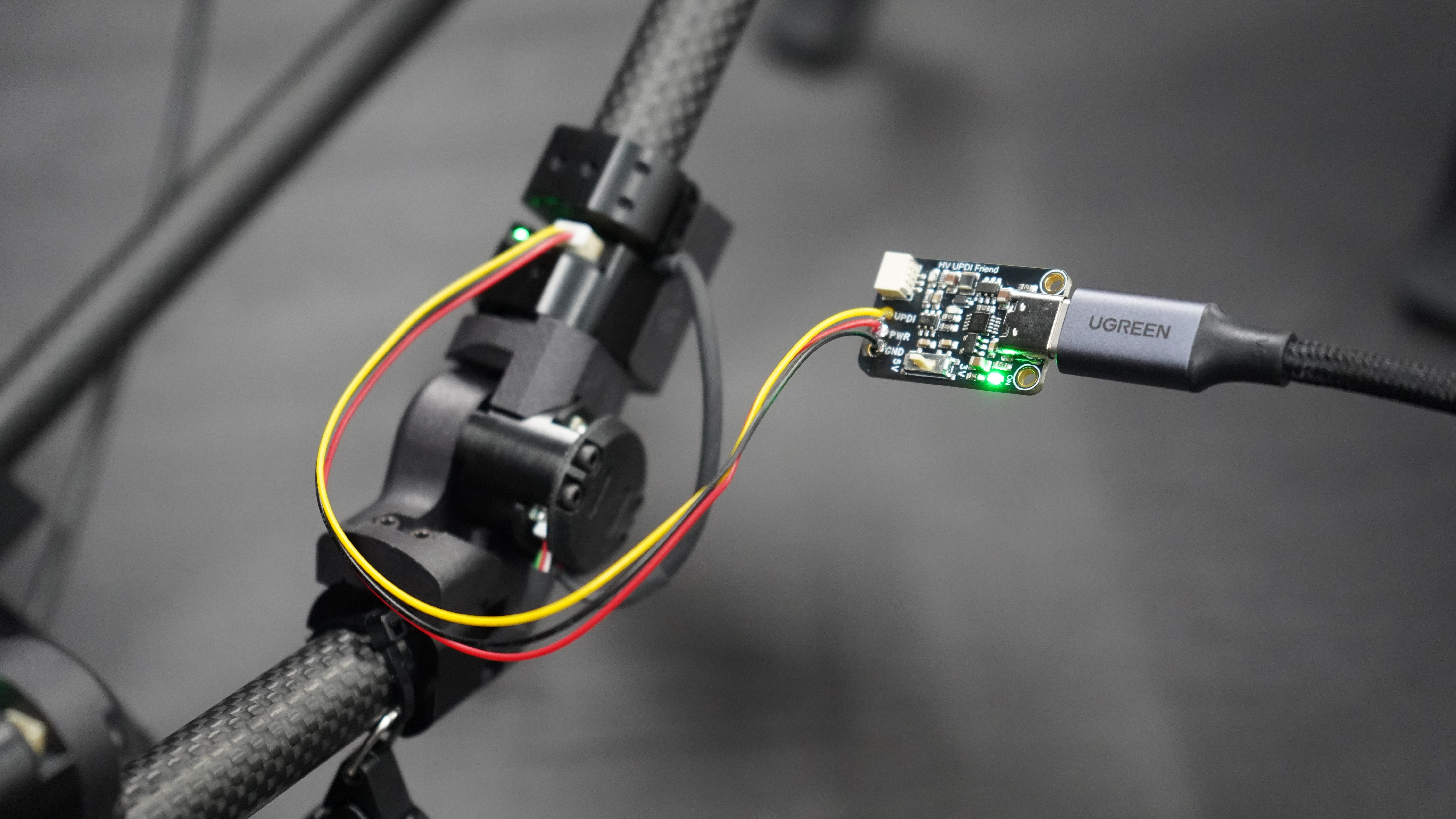
Then run the following command to flash the firmware.
The following command is an example that flashes ID=3. Change DEVICE_ID to flash a different ID.
PLATFORMIO_BUILD_FLAGS="-DDEVICE_ID=3" pio run -t upload --upload-port /dev/ttyUSB0
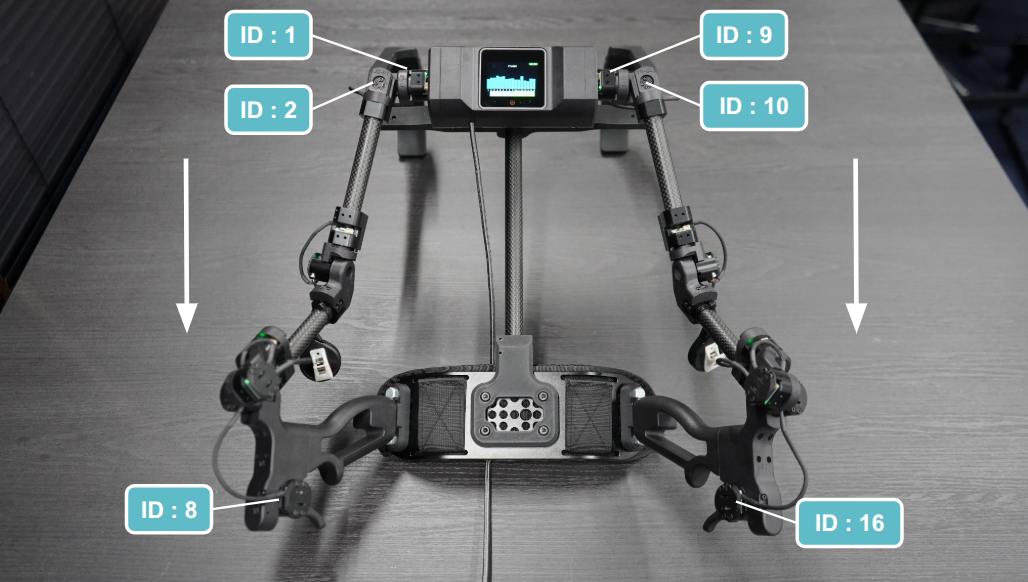
IDs are assigned as follows.
- Right arm: 1–8 (from shoulder to gripper)
- Left arm: 9–16 (from shoulder to gripper)
Optional
While the foot pedal is currently the officially supported interface for controlling data collection states, you may encounter cases where you need an interface directly on the hand/gripper section of the leader arm.
For instance, if your workflow requires complex menu navigation.
The following M5Stack units are verified options that you might find necessary depending on your environment:
We have verified that communicating with these external devices via the controller ports is fully functional.
Signal Noise & Cable Length Constraints
Due to the physical characteristics of communication protocols like I2C, longer Grove cable runs are highly susceptible to signal noise and voltage drops. This can easily lead to communication instabilities or packet loss during data collection.